Stata .do file template

Having a template for new .do files is an easy time saver. This template assumes you're running everything in one file, but this can be easily modified if you break your workflow into multiple do files such as 01_cleaning.do and 02_analysis.do etc with a primary .do file that runs all project .do files if needed. (For more on that type of work flow, check out Scott Long's The Workflow of Data Analysis Using Stata or see a slightly more involved example from Glenn Hoetker here).
Here's the template. Feel free to use/modify for your needs.
**# Set file paths

global project "/absolute/path/to/project-folder"

**# Log start

capture log close    // close any pre-existing logs

* add today's date to the end of the log file name

global YYYY_MM_DD = string(today(), "%tdCCYY-NN-DD")

log using "${project}/log/log-${YYYY_MM_DD}", replace

**# Info

/*

Project:    XXXX

Author:     XXXX

Date:       YYYY-MM-DD

Note:       XXXX

*/

**# Set up

clear all            // Start with clean slate
version 19.5         // Set version for compatibility
set more off         // Disable partitioned output
set varabbrev off    // Do not allow abbreviations of variable names

**# Load data

**# Data cleaning

**# Analysis

**## Aim 1

**## Aim 2

**# Log end

capture log close

* save stata log as text file and expand line width

translate "${project}/log/log-${YYYY_MM_DD}.smcl" ///
    "${project}/log/log-${YYYY_MM_DD}.log", replace linesize(150)
There are many ways to break up sections in text files. In Stata, using **# creates a section bookmark available in the .do file editor equivalent to an H1. This can come in handy when you .do files start getting long. A sub head can be created with **## and so on.
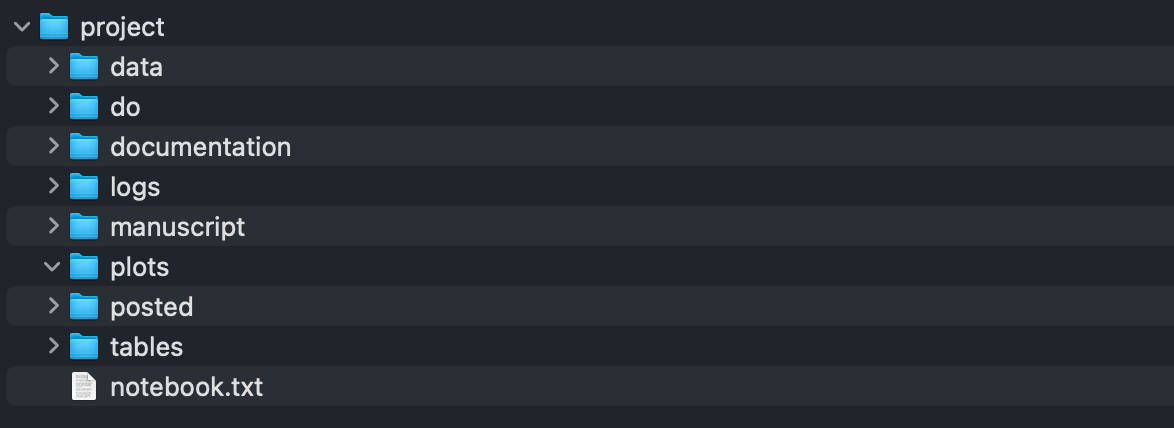
My project folder setup typically looks something like: